495 Locked-Out Companies, Nearly 22 Million Leaked Records: Why Cyber security should be your #1 Enterprise priority.
11 million Burger King records, 495 locked-out companies: what non-technical leaders should ask now.
Three incidents in ten days
On October 5, Monogatari Corporation said 10.79 million member records from its Yakiniku King app had leaked, which is nearly everyone registered (10.81 million users). Two days later, ransomware hit IDCF Cloud, a SoftBank group cloud service that works like a Japanese AWS (companies rent servers and storage from it), and took down systems for 495 companies and local governments, JR East among them. On October 15, BK Japan said about 11.18 million records from the Burger King app had been exposed after unauthorized access between October 2 and 7.
I’m not a security expert. I work in product and data, and like a lot of leaders I’m trying to learn this domain well enough to protect the systems and customers that leaders like us are responsible for. These incidents are a reminder that no company is exempt. Every organization in this article was the victim of a crime, and I’m reading these cases to learn from them, not to judge. Any company that holds customer data at this scale faces the same risks, including the one I work for.
This article is written for executives in the same position: accountable for the outcome, without a security background to judge whether the answers they get from technical teams and vendors are good ones. I’ll start with the numbers, then cover what is known about how these attacks happen, and then where I would begin with older systems that can’t simply be replaced.
The numbers behind the headlines
Japan’s National Police Agency reported 123 ransomware cases for the first half of 2026, the most for any half-year since it started counting in the second half of 2020. Roughly half of the victim organizations said the way in was VPN equipment, the devices that let employees and contractors connect to the company network from outside. The cost side is just as telling. About 60% of victims spent more than 10 million yen on investigation and recovery, and fewer than half were back to normal within a month.
Other counts point the same direction. Macnica, a Japanese security distributor, has logged 119 incidents this year involving stolen or exposed personal data, 83 of them since July 1 (as of October 6, per BleepingComputer). A Korean firm, SK Shieldus, counted 4,744 ransomware victims worldwide in the first half of 2026 and says the second quarter ran about 48% higher than a year earlier. Those global and Japanese figures come from different sources with different methods, so I would not compare them with each other.
There are limits to what any of this proves. The police figure only covers cases reported to the police, so it is a floor. I can’t tell from public data how much of the rise is more attacks and how much is more disclosure. But the 2025 incidents are still fresh. Asahi was hit on September 29, 2025, and said it expected shipments of all products to resume around April 7 this year, about six months later. A few weeks after Asahi, a ransomware attack on Askul, a logistics and e-commerce company, stopped online orders at Muji and Loft, two companies whose own systems were not the ones attacked.
What we know about the app breaches, and what we don’t
The exposed fields are listed in BK Japan’s notice: member ID, name in kanji and kana, email address, phone number, date of birth, gender, prefecture, registration type, whether the member has mobile order history, and whether the email address was verified. Credit card numbers were not exposed because BK Japan doesn’t hold them. Passwords, the company says, were not confirmed as leaked, and no secondary damage had been confirmed when it announced the breach. Access was cut off, and the company reported to Japan’s Personal Information Protection Commission. Its warning to customers was to expect fake emails, texts and calls posing as Burger King.
The card decision is the good news in this story, and it’s a real one. Payment data is the most directly monetizable thing in a customer database, and BK Japan simply never kept it. The data it did keep is still useful to criminals. A real name in both scripts, a birth date, a working mobile number and a verified email is what a scammer needs to write a message that sounds like it comes from the company, and fields like these are often used as identity checks elsewhere.
That is the main unknown. Burger King has not described the method, and on October 13 Japan’s NICT warned that a specific attack pattern, which I’ll explain next, was one factor behind a string of recent leaks. NICT did not say Burger King was an example. Anything beyond that would be me guessing.
How these attacks work, in plain terms
As a non-expert, I found it easier to sort what I read into four mechanisms. Each one has a version that is happening in Japan this month.
The front door. VPN and remote-access equipment sits on the edge of the network, visible to the internet, and it needs regular updates like any other software. Many were installed quickly when remote work took off, and nobody owns the update schedule. Once an attacker is through, many company networks are “flat”, meaning there are no internal walls between systems, so a foothold on one employee’s machine can reach file servers, databases and the accounts that control everything else. In 2022, a ransomware attack on Kojima Press, a Toyota parts supplier, began at a remote-access point at a subsidiary and ended with Toyota stopping all 14 of its domestic plants for a day.
The app talking to the server. A mobile app is a client for servers somewhere else. Attackers can download the app, take it apart, find the server addresses and the format of the requests, and then skip the app and talk to the server directly. If the server only checks that someone is logged in (authentication), and doesn’t check that this particular person is allowed to see this particular record (authorization), an attacker can request records one after another at machine speed. The technical name is broken object level authorization, and it tops OWASP’s list of API risks. This is the pattern NICT warned about on October 13 (it calls it an app-to-backend, or A2B, attack). A near-complete extraction like the one at Yakiniku King, 10.79 million of 10.81 million registered users, would fit this pattern, though nobody has confirmed how it happened, and that is my inference rather than a finding.
Shared infrastructure. IDC Frontier said data in four zones of its East Japan Region 1 would be difficult to recover from the provider’s side, and that customers would effectively need their own backups. According to SDxCentral’s account of the investigation, the attackers used automated scripts to shut down virtual machines and delete snapshots and backups. Screenshots from locked-out customers show a message from the attackers claiming it took them just seven minutes to break into the region. That is the attackers’ own boast and nobody has verified it, so I’d treat it as a claim. What is not a claim is the dependency: 495 organizations had put important systems on one provider and, in many cases, had no copy anywhere else.
The data companies keep. The size of a breach depends as much on what a company stores as on how the attacker got in. The announcements don’t say how many of the leaked records belonged to people who still use the app, and I suspect most companies, mine included, would struggle to answer that question about their own databases.
Why traditional companies are exposed
This section is my reading of the pattern, not something I can prove from the incident reports. The explanation I see most often in Japanese coverage is marunage, the habit of handing nearly all system design, operation and monitoring to outside system integrators. Over the years, internal IT teams at many non-tech companies became buyers and budget managers, with few engineers left who could read an architecture diagram or question a vendor’s patching schedule. If that’s accurate, then when an incident happens the company has no way to investigate on its own and has to ask the vendor what happened.
Budgets probably play a part too. A loyalty app with millions of members is a revenue project with a visible owner and a launch date. Hardening the member database behind it is nobody’s launch. I can’t see inside any of these companies, so this is an inference from how digital projects usually get funded, and it applies to most large organizations, not only the ones in the news.
Vendors are the other recurring thread. LINE Yahoo is the best-documented example in Japan. An infection at a contractor of its Korean affiliate NAVER Cloud led to a leak of more than 500,000 records, and Japan’s communications ministry issued administrative guidance twice. Askul and IDC Frontier show the same dependency from the customer side. None of this is unique to Japan or to Japanese management culture. SK Shieldus reports that the Qilin group used VPN vulnerabilities this year against automakers and a UK medical testing company, which sounds a lot like the Japanese cases.
Where I would start with legacy systems
You can’t replace a legacy system in a quarter, and most of us can’t judge a firewall configuration. What we can do is ask questions that have checkable answers, and notice when the answers are vague. These are the nine questions I’d ask, in the order an attack unfolds, with a rough sense of what a good answer sounds like. I’d treat the technical details as a starting point for the CISO, not as instructions.
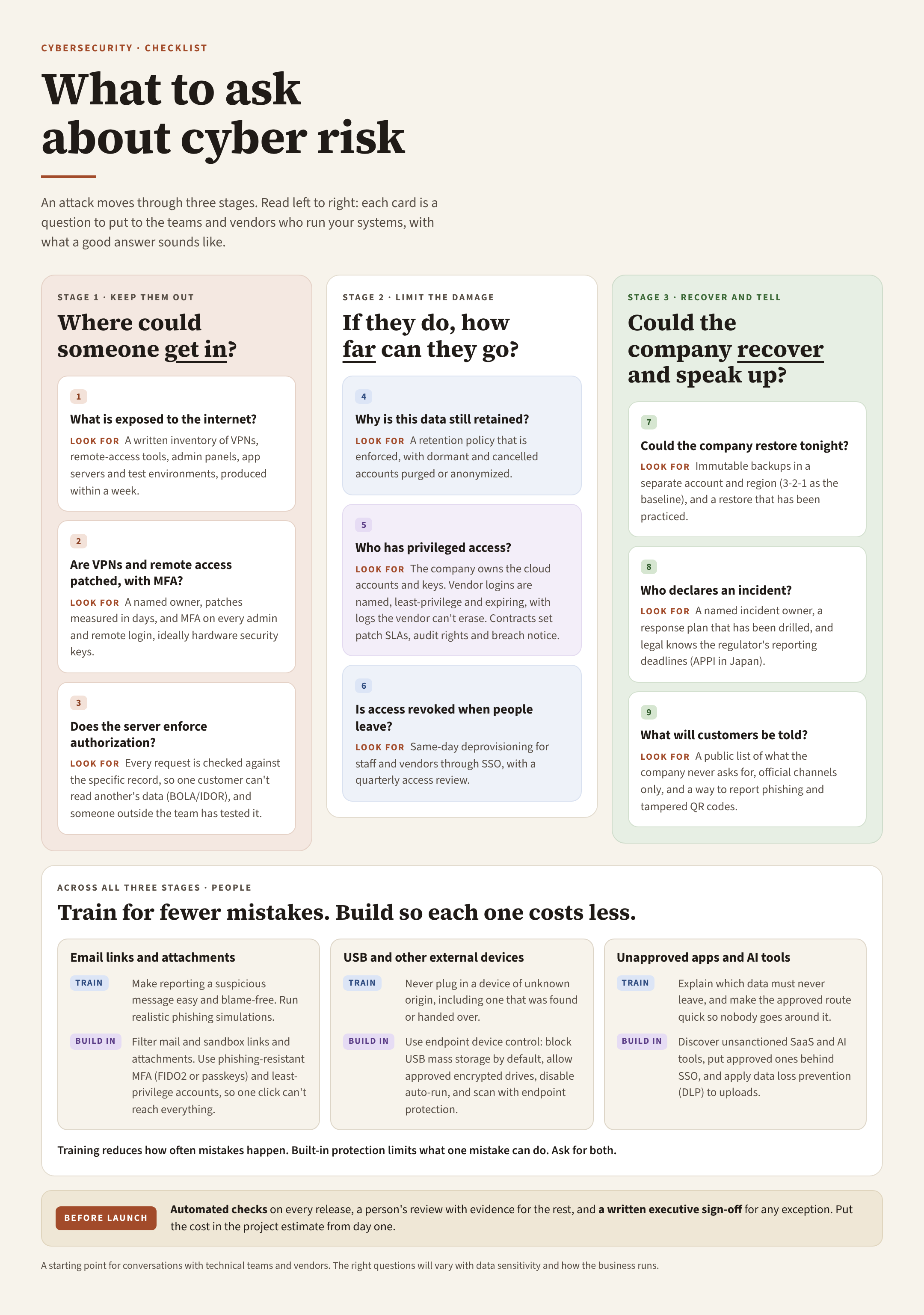
The nine questions and the people layer on one page, as a checklist for a board meeting. (Open interactive HTML version)
Keep them out
1. What is exposed to the internet? Ask for a written list of VPNs, remote-access tools, admin panels, mobile app servers and old test environments. If no one can produce it within a week, that is the first finding.
2. Are VPNs and remote access patched, with MFA? Each VPN or remote-access device should have a named owner and a deadline measured in days for serious fixes. Where a legacy system can’t be patched, the answer should be to isolate it so that a break-in doesn’t spread, or to set a retirement date. Administrator and remote-access logins should also need more than a password, ideally a hardware security key, since texted codes and simple phone prompts can be talked out of people.
3. Does the server enforce authorization? For any mobile app or website that has accounts, ask whether the server verifies that the logged-in user is allowed to see the specific record requested (the broken object level authorization flaw described earlier), and whether an outside party has tested that. The question sounds technical, but a clear yes or no is an easy thing to ask for.
Limit the damage
4. Why is this data still retained? BK Japan’s decision not to hold card numbers is the model. Apply it to everything else: birth dates, phone numbers, accounts nobody has used in years. Ask for a retention policy for each kind of data and evidence that it’s enforced.
5. Who has privileged access, and who owns the accounts? Many companies rely on outside teams to build apps, run data platforms and maintain pipelines, often with access to large amounts of customer data. In the contract, look for patch deadlines for serious vulnerabilities, a right to audit, a duty to notify the company quickly when they’re breached, and the same obligations passed down to subcontractors. If the contract is silent, the company is relying on goodwill, and even a good contract only decides who pays and who must notify whom afterwards. From what I’ve read, the controls that prevent problems are the ones the company holds itself.
- Ownership. The company owns the cloud accounts, code repositories, app store listings, signing keys and data platform, with vendors working inside them instead of holding copies. A company that can’t change vendors without their cooperation doesn’t control the system.
- Named access. Each vendor employee has a named login through the company’s identity system with its MFA, access that is granted per task and expires, and no shared accounts.
- Less data. Developers rarely need real customer data, so masked or sample data for development and testing limits what a bad employee or a breach can reach.
- Own logs. The company keeps the access logs itself, somewhere the vendor can’t delete them, with alerts for bulk exports and odd-hours access.
6. Is access revoked when people leave? Single sign-on with separate roles per system is easier to shut off than a separate password for every system, because one action on someone’s last day closes access everywhere.
- Account shutdown is triggered by the HR exit process and done the same day.
- Privileged access is reviewed quarterly, with each system owner signing off.
- Vendors report their leavers, or their logins expire every 90 days unless renewed.
- Service accounts and API keys tend to outlive everyone, so each needs an owner and a rotation schedule.
- Each quarter, a few recent leavers are checked to confirm their access is really gone.
Recover and tell
7. If everything in the main environment were encrypted tonight, what could be restored? IDC Frontier’s customers are the case study. A good answer has three parts.
- Separation. Copies sit outside the provider and outside the administrator accounts an attacker would take over. On AWS that means a separate account with its own logins and MFA, since attackers who take over administrator credentials delete backups held in the same account. A second region (Osaka, if the primary is in Tokyo) also protects against an outage or disaster.
- Protection. At least one copy can’t be changed or deleted, even by administrators, using a locked backup vault with a set retention date. The common 3-2-1 rule (three copies, two types of storage, one off-site) is the baseline. Backups also need encryption, keys under separate control and a log of who reads them, because locking a copy protects against deletion, not theft.
- Proof. Someone restores from the backup on a schedule and times it, because a backup nobody has restored is a guess.
8. Who declares an incident? A named person should have the authority to call it, and the company should have run a drill. Reports to the Personal Information Protection Commission are time-bound, and your lawyers should walk you through the exact deadlines, since I’m not the right source for that.
9. What will customers be told? Decide before an incident what the company never asks for, where customers should go for official information, and how they can report a fake message. The section on protecting customers, after the launch gate, covers this in more detail.
People will click, plug in and sign up
The nine questions are about systems, but people are part of every system. Staff open email attachments, plug in USB drives and sign up for tools nobody approved, usually while trying to get their work done. To be clear about what the sources say, the incidents above were mostly traced to exposed equipment and application flaws, and none of them was publicly attributed to a phishing email or a USB stick. These habits are still among the most common ways in, which is why they belong on the list.
I think of it as two jobs. Training reduces how often a mistake happens. Built-in protection limits what one mistake can do. Training alone won’t hold, because someone will eventually be tired or rushed, so each risk below has both.
- Email links and attachments. Train people to report suspicious messages without fear of blame, and run regular simulated phishing so reporting becomes a habit. Build in filtering for links and attachments, MFA that resists phishing (security keys or passkeys), and limited permissions so a stolen login can’t reach everything.
- USB and other external devices. Train people to treat found or gifted drives as unsafe. Build in controls that block or restrict removable storage on company devices, and scan anything that is allowed in.
- Unapproved apps and AI tools. Train people on what may not be pasted into public tools, such as customer data or source code. Build in an approved list of tools that are easy to get, so people don’t go looking elsewhere, plus data loss prevention and monitoring for unknown apps and AI services connected to company accounts.
The approved-tools point matters more than it looks. If the sanctioned route is slow, people will find a faster one, and that is how shadow IT grows. A short, fast approval path does more than a stern policy.
Ask for both halves of the answer. If a leader hears only about training, nothing limits the damage from the next mistake. If they hear only about technical controls, staff will work around them.
Make security and recovery a gate before launch
The nine questions fix what exists today. Left alone, new systems will recreate the same problems, so it makes sense to also change how new things get released. Before any app, data pipeline or service goes live, it should pass a short gate that covers security guardrails and business continuity, and the gate should apply equally to what internal teams build and what vendors deliver. A project that fails the gate doesn’t launch until it passes or an executive signs off on the exception in writing.
The gate doesn’t need to be heavy, and it shouldn’t be, because teams will route around a process that slows every release. The part a machine can check should be automated and run on every release. I’d start with these:
- No unexpected services exposed to the internet, and no passwords or keys left in the code.
- A scan of the software components used, with serious known flaws fixed or explained.
- MFA enforced on administrator and vendor logins, and logging switched on.
- Encryption enabled, and backups configured in a separate account.
Companies without a large security team can use AI to help with the automated side. Tools that scan for internet-exposed assets and test apps and APIs are within reach now, and AI-assisted code review can add to them. As far as I understand, automated tools are weakest on authorization flaws like the one in question 3, because those depend on how the business works, so I’d pilot one against a human penetration test before relying on it. Get written permission before testing anything a vendor hosts, and keep source code and customer data out of public AI tools.
The rest needs a person, so it’s a semi-manual review with evidence attached:
- A test that shows the server checks whether each user may see the specific record they request, run by someone other than the developer.
- A successful restore from the protected backup copy, with the time it took, compared against the recovery target the business agreed.
- The list of vendor accounts and what data each can reach, plus a named owner for every account.
- A retention rule for the personal data the system will hold.
- A contact for incidents, and who decides whether something is an incident.
The cost of all this belongs in the project estimate from day one, including backup and recovery work as its own line in vendor quotes, so the gate isn’t competing with the launch date for the same money. I haven’t seen any company’s gate in practice, so I’m not claiming a particular design is proven. I’d treat the checklist as a first version, see which items teams struggle with, and tighten it from there.
Protecting the customers who trust us
So far this has been about protecting the company, but the people most exposed in these incidents are customers. They chose to hand over a name, a phone number and a birth date, and they had no say in which vendors or systems sit behind the app. I think leaders owe them more than an apology notice after the fact. Burger King’s own warning is the clearest example. Its advice to members was to watch for fake emails, texts and calls posing as the company, because the stolen data now helps scammers sound real.
Some protection has to be in place before anything goes wrong:
- Say what you will never ask for. A public line such as “we will never ask for your password or a one-time code by email, text or phone” gives customers a rule they can apply to a fake message, and gives support staff something to point to.
- Name the official places. Tell customers that the official app and the official domain are the only places to log in or claim anything.
- Plan the warning. Decide in advance how customers can report a suspicious message and how quickly the company can warn everyone.
- Hold less data. What a company never stored can’t be used to impersonate it, which is the same logic as the card numbers at BK Japan.
QR codes show how the same trick works offline. Scanning a code opens a link you can’t read first, and a criminal can stick a different code over the real one, as happened at more than two dozen parking stations in Austin, Texas, before the FBI issued a warning. A company running reward or stamp programs can print the web address under the code, check the codes regularly, and never ask for a password or card details through them. The same suspicion applies to an employee’s work phone, which a fake login page can fool as easily as a customer’s. The evidence I found is from the US, and I haven’t found Japanese cases.
What I still don’t know
The cause of both app breaches is the obvious gap. I also don’t know whether the 10.79 million at Yakiniku King and the 11.18 million at Burger King share a cause, or whether it is a coincidence of timing that my brain wants to turn into a story.
The tradeoff I can’t resolve is the budget one. The cost figures from the police suggest recovery is expensive and slow, but they don’t tell any single company what prevention would cost it, or how much of the old estate it can afford to wrap, isolate or retire in a given year. Spending on work whose success looks like nothing happening is hard to defend in a planning meeting, and I haven’t found a better argument than the case studies above. One practical step is to make backup and recovery a required line in every project estimate. The business sets the recovery target, meaning how many hours or days of downtime it can accept, and a shorter target costs more. That conversation gives the number a reason.
So the question I’d suggest any leader put to their own team is a narrow one. In one of this month’s app breaches, unauthorized access ran for five days, October 2 to 7, and the company says it confirmed the leak on October 13. If someone spent five days inside a customer system, how would the company find out, and how sure could it be about what they took?
Sources
- ITmedia: Burger King app, about 11.18 million records (Oct 15, 2026)
- Impress Watch: Burger King member data leak
- Fukui Shimbun: BK Japan leak, field list
- ASCII.jp: Yakiniku King, 10,788,963 records
- IT Trend: Yakiniku King timeline
- @IT: NPA first-half 2026 threat report summary
- BleepingComputer: IDCF Cloud ransomware, Macnica figures
- SDxCentral: IDC Frontier attack details
- VPS Ranking: IDC Frontier third report summary
- Digital Today: SK Shieldus ransomware report
- Drinks Business: Asahi shipments
- The Record: Askul attack
- CNN via ABC7: FBI warning on tampered QR codes